


Battery Charging Effect Screen
4,3183.00 Arvustused
Rakenduse andmed
- Versioon
- 1.4.0
- Uuendatud
- Litsents
- Free
- Allalaadimised
- 1 000 000+
- Arendaja
- LordEagle JSC
- Kategooriad
- Isikupärastamine
- Platvorm
- Android
Ekraanipildid
 Analüüsis AppCompare
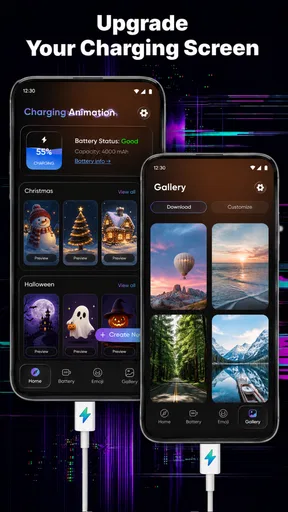
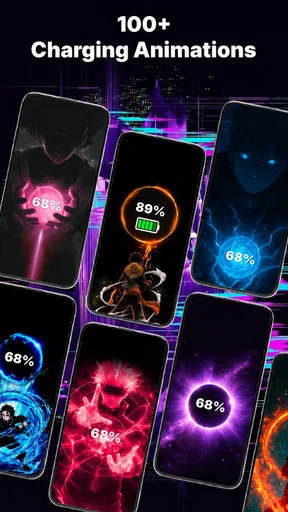
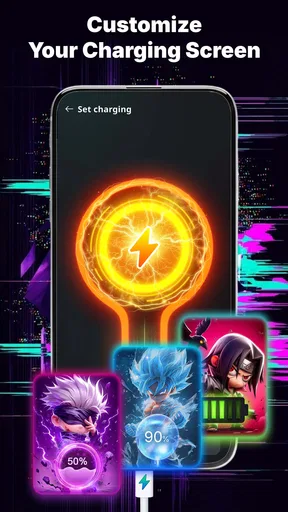
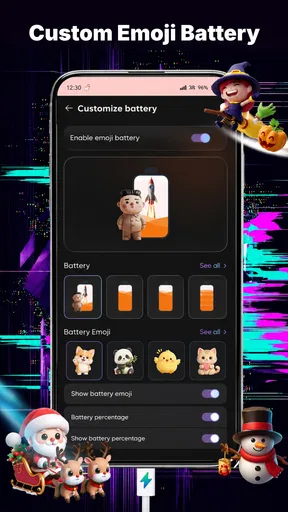
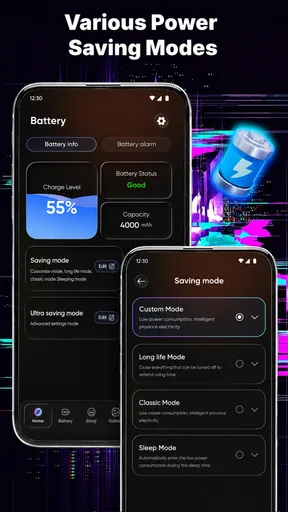
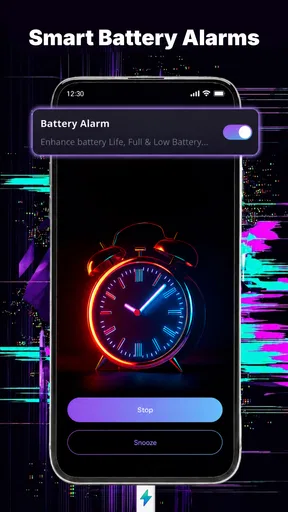
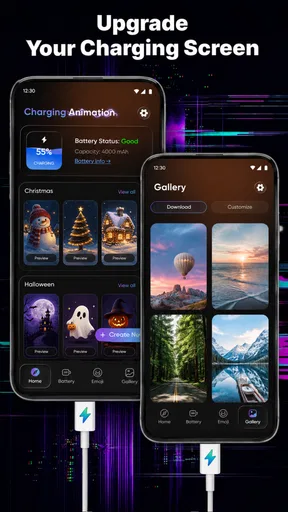
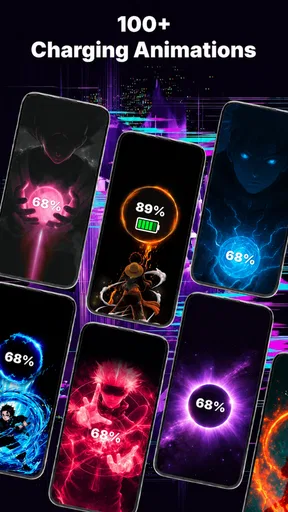
Battery Charging Effect Screen on Android is a personalization app for people who want the moment of connecting a charger to feel more noticeable. I tried to judge it less like a serious battery utility and more like a visual layer for the lock screen. That distinction matters: its appeal is the charging animation itself, not battery diagnostics, faster charging, or a replacement for the phone’s system settings.
The app is made by LordEagle JSC and is available free of charge. Its store information shows a 4.3 average from around 2.1 thousand ratings, with more than a million installs. Those figures suggest that the idea has found a sizeable audience, but they do not change the basic question I would ask before installing it: do you actually enjoy a decorative effect every time your phone starts charging?
What the app changes when your phone starts charging
Battery Charging Effect Screen belongs to the personalization category, and that is the right way to understand it. Instead of adding a complicated toolkit for redesigning the entire phone, it focuses on one small event: plugging in the charger and seeing a visual charging effect on the lock screen. For someone who likes a more expressive phone interface, this can make an otherwise plain moment feel customized.
I found the concept easy to understand. You are not installing it to manage battery health or investigate why a device is charging slowly. You are installing it because the standard charging indication feels too ordinary. The app’s short store description, “Battery Charging Effect,” is simple, but it accurately points to the central experience rather than promising a broader utility.
That narrow focus is both its strength and its limitation. A focused app can be pleasant when it does one decorative job without making you learn a large system. At the same time, anyone expecting charging schedules, battery reports, temperature information, or a technical explanation of power usage should look for a dedicated battery tool instead. This app should sit beside those tools, not be confused with them.
How I would use it in daily life
A realistic example is an evening routine. I come home, place my phone on a charger, and leave it on a table where the lock screen is visible. A charging animation gives that action a little more personality and makes it immediately obvious that the phone has recognized the connection. This is especially useful for people who keep their device in a stand or use it as a bedside clock-like display while it charges.
There is also a small practical benefit in visual confirmation. If I connect a cable while moving around, I can glance at the screen and see a charging presentation instead of relying only on a tiny system icon. I would not treat the animation as proof that the charger is healthy or that the battery is receiving power at an ideal rate, but it can make the connection feel more visible.
Tasub enne valimist lugeda
Xiaomi ilmarakendus aitab päeva planeerida, kuid kogukonda ei loo

PLAYit leiab telefonist peaaegu iga video, kuid mugavusel on hind

TikTok Lite viib lühivideod väiksema andmekuluga kaugemale

Prime Video võit sõltub sellest, mida vaataja telefonis leiab

Moovit ei juhi busse, kuid mõjutab seda, kuidas linnas liigume
Nädala valik: Microsoft 365 Copilot aitab tööga kiiremini alustada
Another use case is shared spaces. A bright or distinctive lock-screen effect can help separate your phone from another device on a desk, provided you are comfortable with a more noticeable appearance. That will appeal to users who enjoy matching their phone to a favorite color or a particular visual mood. It will annoy users who prefer a quiet, nearly invisible interface.
What the free price means for its value
The clearest value point is that the app is free. I can test the charging animation without committing money, which makes experimentation easy. For a cosmetic app with a narrow purpose, that matters more than it would for a productivity tool. If the effect does not suit my phone or becomes tiring after a few days, uninstalling it does not leave me with a purchase I regret.
Free access also changes how I evaluate the app. I do not expect it to replace a complete customization suite. Instead, I ask whether the visual change is enjoyable enough to justify installing one more app and allowing it to take part in the charging experience. For some users, the answer will be yes because the appeal is emotional and visual rather than functional.
I would still avoid assuming that free automatically means frictionless. Any app that appears on a lock screen can affect how the phone feels in everyday use, even when the main feature is simple. Before making it part of a bedtime routine, I would test it during the day, check whether the presentation feels too bright or distracting, and see whether the normal lock-screen information remains comfortable to read.
That is an important trade-off: the price is easy to accept, but your attention is still a resource. If the animation repeatedly catches your eye when you want the phone to stay quiet, the app may offer less value than its free label suggests. In my view, the best way to assess it is to use it through several charging sessions rather than deciding after one impressive first look.
Where it fits beside ordinary alternatives
The usual alternative is simply the charging indicator already built into Android or the phone manufacturer’s interface. That option is calmer, integrated into the system, and unlikely to introduce another visual layer. If you only need confirmation that charging has started, the built-in indicator is usually the better choice because it does not ask you to personalize anything.
Another alternative is a complete launcher, wallpaper, or lock-screen customization app. Those tools can change much more of the phone’s appearance, but they may also require more setup and can overwhelm someone who only wants a charging effect. Battery Charging Effect Screen is more appealing when the user wants a small change rather than a full redesign.
Dedicated battery applications are a different comparison altogether. They are better for people who want information about consumption, charging behavior, or battery condition. This app’s value is visual. I would install both only if I genuinely wanted a decorative lock-screen moment and separately needed technical battery information; installing this one alone will not answer technical questions about the battery.
The trade-off is therefore quite clear. The system indicator wins on simplicity, a broad customization suite wins on depth, and a battery monitor wins on information. This app sits between them as a lightweight visual extra. That position makes sense, but only for a user who appreciates the specific charging presentation rather than expecting an all-purpose phone enhancement.
Small details I would consider before keeping it
My first tip is to judge the effect in the place where you normally charge. A presentation that looks attractive in a bright room may feel intrusive beside a bed at night. I would connect the phone in the actual location, leave it there for a while, and decide whether the lock-screen appearance complements the space or becomes a distraction.
My second tip is to test it with different charging habits. Someone who plugs in briefly several times a day will see the effect much more often than someone who charges only overnight. The same animation can feel fun when it appears occasionally and repetitive when it appears at every short top-up. This usage pattern is more important than a quick first impression.
My third tip is to treat the visual effect as confirmation, not measurement. If the phone displays the animation, I can take it as a convenient sign that the charging event has been noticed, but I would still rely on the phone’s normal battery information for the actual percentage and charging status. This prevents a decorative feature from being mistaken for a diagnostic one.
I would also keep the app’s narrow purpose in mind when deciding whether to leave it installed. If I regularly change wallpapers, icons, and lock-screen styles, one more personalization layer may fit naturally into my setup. If I prefer a clean phone with only essential apps, the charging animation may not earn its place after the novelty fades.
Compatibility and everyday expectations
The listed minimum operating-system requirement is Android 7.0, so the app is aimed at a wide range of Android devices rather than only recent phones. That is helpful for people using older hardware who still want a small visual refresh. Even so, the experience can feel different across phones because lock screens and charging behavior are often shaped by the device maker’s own interface.
I would therefore install it with realistic expectations on a device that already has a heavily customized lock screen. The app’s central idea may be straightforward, but the way a phone handles overlays, screen wake behavior, and charging notifications can influence how natural the result feels. I would not assume that an effect designed for one Android interface will look identical on every manufacturer’s software.
The app is rated PEGI 3, which fits its decorative and general-audience nature. That makes it suitable as a harmless personalization choice for a broad audience, although parents should still apply their usual judgment about installing apps on a child’s phone. The age label describes the content category; it does not turn the app into a battery-safety tool.
The current version is 1.4.0, and the release date shown for the app is 6 August 2025. I mention those details because they help identify the version being considered, especially when an app’s appearance changes over time. If the behavior on a particular phone differs from what I expect, checking that the installed version matches the current listing would be a sensible first step.
Who will enjoy it most
I think the strongest audience is someone who notices small interface details. If you enjoy changing wallpapers, choosing a visual theme, or making a phone feel more personal, a charging animation can be a satisfying finishing touch. The app is also a good low-risk experiment for anyone curious about lock-screen personalization because the download does not require a paid purchase.
It can work well for people who charge their phone in a visible place and like a clear visual moment when the cable is connected. A desk worker, a student charging between activities, or someone who leaves the phone on a stand may see the effect often enough to appreciate it. The value comes from repeated small enjoyment, not from a major change to what the phone can do.
I would be more cautious about recommending it to minimalists. If your ideal lock screen shows only the time, notifications, and battery percentage, an animated charging presentation may feel like clutter. The same applies to anyone who finds motion distracting or wants the phone to remain visually quiet while charging overnight.
I would also suggest skipping it if your main goal is battery management. It will not be my first choice for investigating drain, improving charging habits, or understanding battery condition. A dedicated battery utility or the phone’s own settings would be more appropriate for those needs. Choosing the right category is more important than choosing the most attractive animation.
My final recommendation
After looking at the app as both a personalization tool and a free download, I see Battery Charging Effect Screen as a focused extra rather than an essential installation. Its best quality is that it gives a normally forgettable action a distinct visual identity without asking me to redesign the entire phone. For the right user, that is enough to make it worthwhile.
The main compromise is that the benefit is subjective and repetitive use can reduce its appeal. I would not recommend it to someone who wants measurable battery improvements, detailed technical information, or a completely unobtrusive lock screen. In those situations, the built-in Android experience or a specialized battery app is a better match.
For everyone else, the free price makes trying it reasonable. I would install it, test the effect in my normal charging location, and pay attention to whether it remains pleasant after the first few sessions. If it adds a small moment of personality without disturbing the way I use the lock screen, I would keep it. Its real value is visual enjoyment, not battery expertise, and understanding that boundary is the key to deciding whether it belongs on your phone.
Overall, LordEagle JSC has produced an app with a clear purpose: make charging look more customized. With its broad Android compatibility starting at version 7.0, free access, and general-audience PEGI 3 rating, it is easy to approach. I would recommend it to people who want a more expressive charging screen, while advising practical users to stay with the system indicator or choose a battery-focused alternative.
Plussid
- Loomingulised laadimisanimatsioonid muudavad telefoni kasutamise lõbusamaks.
- Rakendus pakub mitmesuguseid visuaalseid efekte eri stiilide ja teemadega.
- Efekti saab kohandada vastavalt kasutaja isiklikule maitsele.
- Lihtne kasutajaliides võimaldab animatsiooni kiiresti aktiveerida.
- Sobib hästi neile
- kes soovivad laadimise ajal ekraani isikupärastada.
Miinused
- Mõned efektid võivad sisaldada palju reklaame või rakendusesiseseid oste.
- Animatsioonid võivad suurendada aku- ja süsteemiressursside kasutust.
- Kõik funktsioonid ei pruugi töötada ühtviisi hästi eri telefonimudelitel.
- Taustal töötamiseks võib olla vaja anda rakendusele täiendavaid õigusi.
- Pidev ekraaniefekt võib laadimise ajal telefoni rohkem soojendada.
Korduma kippuvad küsimused: Battery Charging Effect Screen
Mis on Battery Charging Effect Screen ja mida see rakendus teeb?
Battery Charging Effect Screen on Androidi rakendus, mis kuvab telefoni laadimise ajal ekraanile animeeritud visuaalseid efekte. Rakendus on mõeldud kasutajatele, kes soovivad muuta tavalise laadimisekraani värvilisemaks ja isikupärasemaks. Saadaval võib olla erinevaid animatsioone, taustu, helisid ja kujundusi, kuid täpsed võimalused sõltuvad rakenduse versioonist ning sinu telefoni tootja ja Androidi seadistustest.
Kas Battery Charging Effect Screen töötab kõigi Android-telefonidega?
Rakendus peaks toimima paljudes Android-seadmetes, kuid täielik ühilduvus ei ole kõigi telefonide puhul garanteeritud. Mõned tootjad piiravad taustal töötavaid rakendusi, automaatset käivitumist või lukustuskuval kuvatavat sisu. Pärast paigaldamist tuleb rakendusele vajaduse korral anda õigused, lubada automaatne käivitumine ning eemaldada aku optimeerimise piirangud. Kui efekt ei ilmu, tasub kontrollida ka süsteemi teavituste ja ekraaniseadete valikuid.
Kas rakendus vajab töötamiseks erilisi õigusi?
Battery Charging Effect Screen võib vajada õigust kuvada sisu teiste rakenduste peal, käivituda seadme laadimise alustamisel ning saata teavitusi. Need õigused võimaldavad laadimisanimatsioonil nähtavaks muutuda ka siis, kui ekraanil on mõni muu rakendus või telefon on lukustatud. Enne lubamist tasub õiguste kirjeldus üle vaadata. Kui rakendus küsib ebavajalikke ligipääse, näiteks kontaktidele või sõnumitele, ole ettevaatlik ja ära anna neid ilma selge põhjuseta.
Kas Battery Charging Effect Screen mõjutab aku kestvust või telefoni jõudlust?
Laadimisefektid kasutavad animatsioonide kuvamiseks mõningal määral protsessorit, graafikat ja ekraani, mistõttu võib energiatarve olla veidi suurem kui tavalisel laadimisekraanil. Mõju on enamasti väike, kuid vanematel või väiksema jõudlusega telefonidel võivad keerukad animatsioonid põhjustada aeg-ajalt viivitusi. Kui soovid akut säästa, vali lihtsam efekt, vähenda animatsioonide kasutamist või lülita rakendus laadimise ajal välja.
Kas Battery Charging Effect Screen on tasuta ja kas selles võib olla reklaame?
Rakenduse põhifunktsioonid võivad olla tasuta kasutatavad, kuid mõni efekt, taust või lisaseade võib olla saadaval ainult reklaami vaatamise, rakendusesisese ostu või tasulise versiooni kaudu. Tasuta kasutamisel võivad ekraanile ilmuda reklaamid, eriti kujunduste sirvimisel või seadete muutmisel. Enne allalaadimist kontrolli Google Play poe kirjeldust, hinnangut, viimaseid arvustusi ning rakendusesiseste ostude ja andmekasutuse teavet.


